WordPress AI chatbot integration has become a transformative strategy for enhancing user engagement and automating customer support. This comprehensive guide provides a detailed roadmap for implementing AI chatbots across different WordPress environments, covering technical implementation, security considerations, and advanced workflow automation. Based on current industry practices and emerging technologies, this guide addresses three primary integration approaches: plugin-based solutions, custom code implementations, and webhook-driven architectures. Each method offers distinct advantages in terms of customization, control, and scalability, making them suitable for different organizational needs and technical capabilities.[1][2][3][4]
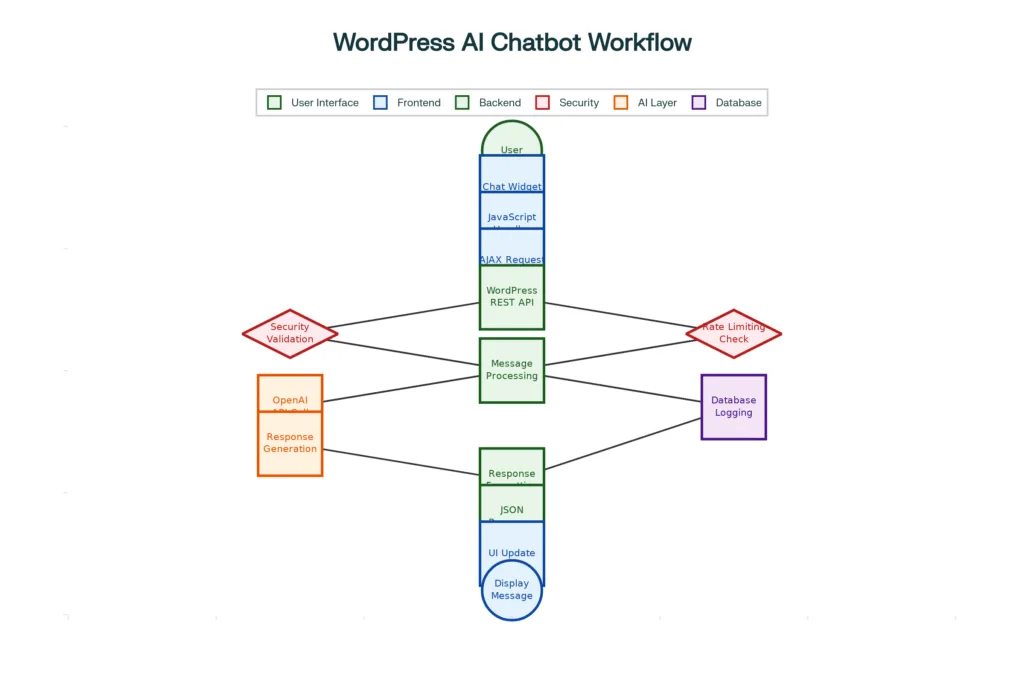
WordPress AI Chatbot Integration Architecture and Workflow
WordPress AI Chatbot Architecture and Technical Foundation
Core Components and System Architecture
Modern WordPress AI chatbot implementations rely on a multi-layered architecture that seamlessly integrates frontend user interfaces with backend processing systems. The architecture typically consists of five primary components: the user interface layer handling chat widgets and user interactions, the frontend processing layer managing JavaScript events and AJAX communications, the WordPress backend layer containing REST API endpoints and authentication systems, the AI integration layer facilitating communication with external AI services, and the database layer storing conversation logs and configuration data.[5][6][7][8]
The user interface layer serves as the primary interaction point between visitors and the chatbot system. This layer encompasses both floating and embedded chat widgets that can be deployed across WordPress sites using shortcodes or direct theme integration. The frontend processing layer utilizes JavaScript to handle real-time messaging, implement typing indicators, and manage session persistence across page navigations. This layer also includes sophisticated error handling mechanisms and retry logic to ensure reliable user experiences even during network interruptions.[9][10][11][12]
The WordPress backend layer functions as the central orchestration point for chatbot operations, providing secure REST API endpoints that validate user inputs, manage authentication, and coordinate with external AI services. This layer implements comprehensive security measures including nonce verification, rate limiting, and input sanitization to protect against common web vulnerabilities. The AI integration layer handles communication with external services such as OpenAI, Anthropic, or local AI servers, managing conversation context and formatting responses according to specific requirements.[13][14][15][16]
Database Design and Data Management
WordPress chatbot implementations require carefully designed database structures to support conversation logging, user session management, and configuration storage. The database layer typically includes tables for conversation history, user sessions, chatbot configurations, and analytics data. Conversation logging serves multiple purposes including user experience analysis, chatbot performance optimization, and compliance with data retention policies.[17][18][19]
Effective session management enables chatbots to maintain context across multiple interactions and page visits, creating more coherent conversational experiences for users. This involves storing session identifiers, conversation history, and user preferences in a structured format that can be quickly retrieved during subsequent interactions. Configuration management systems allow administrators to customize chatbot behavior, appearance, and response patterns without requiring code modifications, providing flexibility for different use cases and organizational requirements.[20][21][22]
Implementation Approaches and Technical Strategies
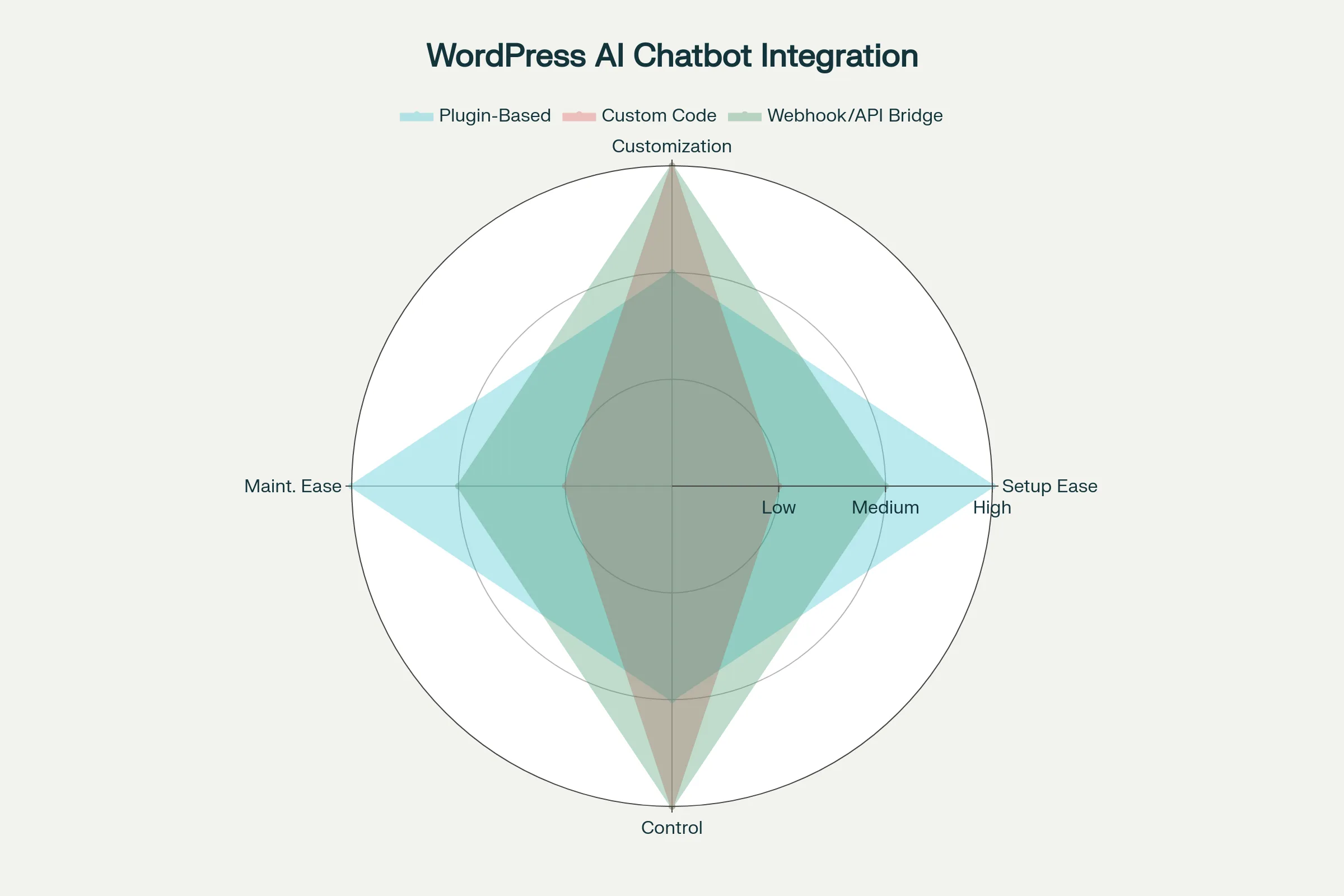
WordPress AI Chatbot Integration Approaches Comparison
Plugin-Based Integration Solutions
Plugin-based chatbot implementations represent the most accessible approach for WordPress users seeking to integrate AI functionality without extensive technical expertise. Popular solutions include WPBot, Tidio, ChatBot.com, and S2B AI Assistant, each offering distinct features and integration capabilities. These plugins typically provide user-friendly configuration interfaces, pre-built chat widgets, and direct integration with major AI platforms including OpenAI, Google Gemini, and Anthropic Claude.[23][24][25][26]
WPBot stands out as a comprehensive solution supporting OpenAI integration, fine-tuning capabilities, multilingual support, and conversational form creation. The plugin offers both free and premium tiers, with advanced features including automated lead generation, FAQ management, and integration with popular WordPress plugins. Installation requires minimal technical knowledge, involving plugin activation, API key configuration, and basic customization through the WordPress admin interface.[1][27]
Tidio provides AI-powered responses combined with live chat functionality, making it particularly suitable for e-commerce and customer service applications. The platform excels in providing hybrid automation where AI handles routine inquiries while seamlessly transferring complex conversations to human agents. Tidio’s drag-and-drop builder enables users to create sophisticated conversation flows without coding knowledge, while its integration capabilities extend beyond WordPress to include Shopify, Facebook Messenger, and WhatsApp.[5][28][29]
Custom Code Implementation Strategies
Custom code implementations offer maximum flexibility and control over chatbot functionality but require significant technical expertise. This approach involves direct integration with AI APIs, custom database design, and comprehensive security implementation. The primary advantage lies in complete customization capability, allowing developers to create highly specialized chatbot experiences tailored to specific organizational requirements.[30][31][32][33]
The implementation process begins with creating a custom WordPress plugin structure that includes proper security measures, API integration logic, and database management functions. Developers must implement secure REST API endpoints that handle user authentication, input validation, and rate limiting to prevent abuse. The frontend implementation requires sophisticated JavaScript code to manage real-time messaging, typing indicators, session persistence, and error handling mechanisms.[34][35][36]
Security considerations become paramount in custom implementations, requiring developers to implement comprehensive protection against common vulnerabilities including SQL injection, cross-site scripting (XSS), and cross-site request forgery (CSRF) attacks. API key management demands careful attention, with keys stored securely using environment variables or encrypted configuration systems rather than hardcoded values.[16][25][37][38]
Webhook and API Bridge Solutions
Webhook-driven chatbot implementations provide a middle ground between plugin simplicity and custom code flexibility.[39]
A basic flowchart illustrating user navigation and decision points to explain how flowcharts and decision diagrams work.
This approach utilizes external automation platforms such as Zapier, Make.com, or n8n to create sophisticated workflows that connect WordPress sites with AI services through webhook triggers. The architecture enables complex multi-step processes including data retrieval, external API calls, and conditional logic without requiring extensive coding expertise.[26][28]
Webhook implementations excel in scenarios requiring integration with multiple external services or complex business logic. For example, a chatbot might need to query inventory systems, update CRM records, and send email notifications based on user interactions. These workflows can be visually designed using drag-and-drop interfaces while maintaining sophisticated functionality.[24]
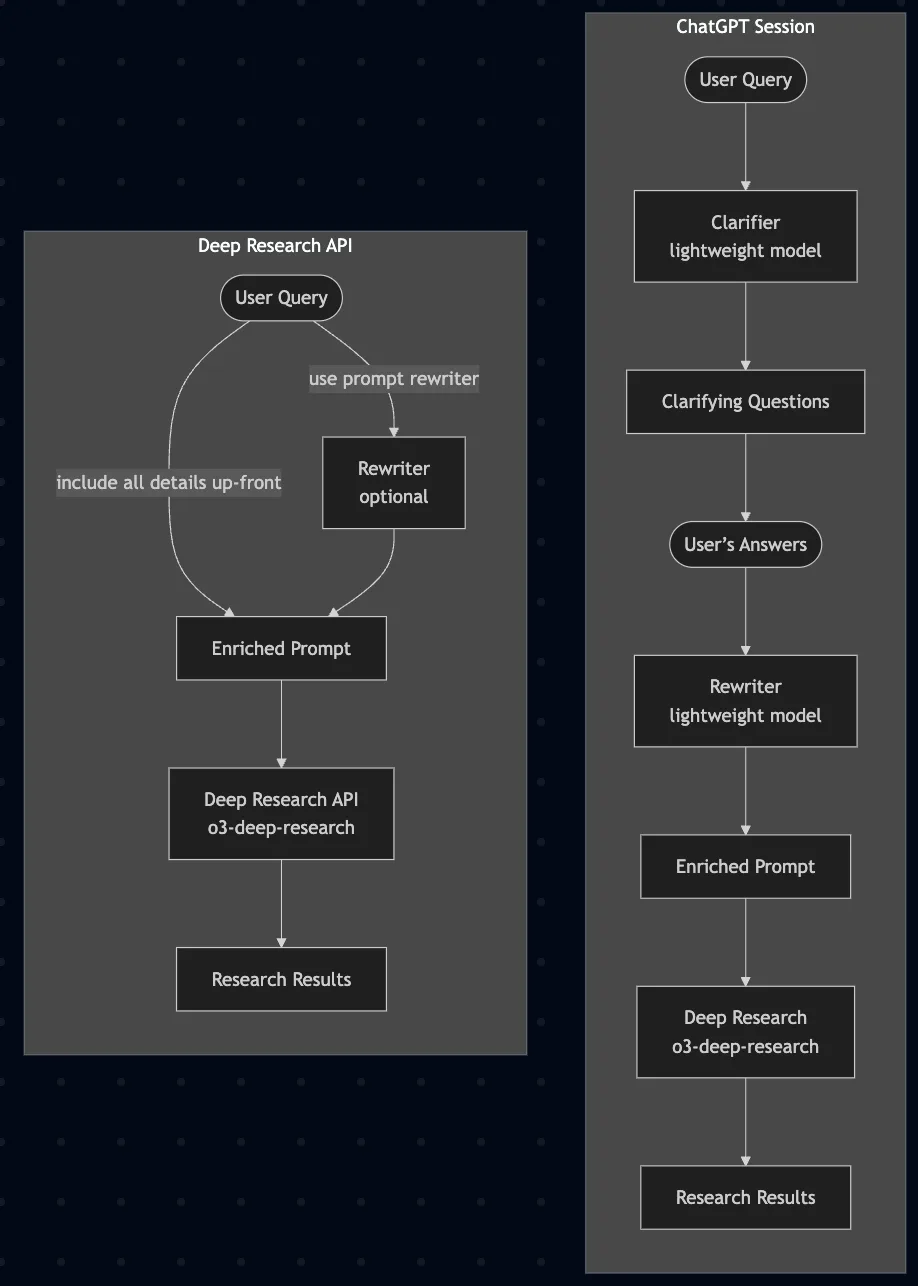
Flowchart showing the workflow of query enrichment and deep research using OpenAI API, including optional rewriting and clarifying models, leading to research results.
The technical implementation involves creating webhook endpoints within WordPress that trigger external workflows when specific events occur. These workflows can then process user inputs, make AI API calls, and return formatted responses to the WordPress site. This architecture provides excellent scalability and maintainability while reducing the computational load on WordPress servers.
Security Implementation and Best Practices
API Key Management and Authentication
Secure API key management represents a critical foundation for WordPress AI chatbot implementations
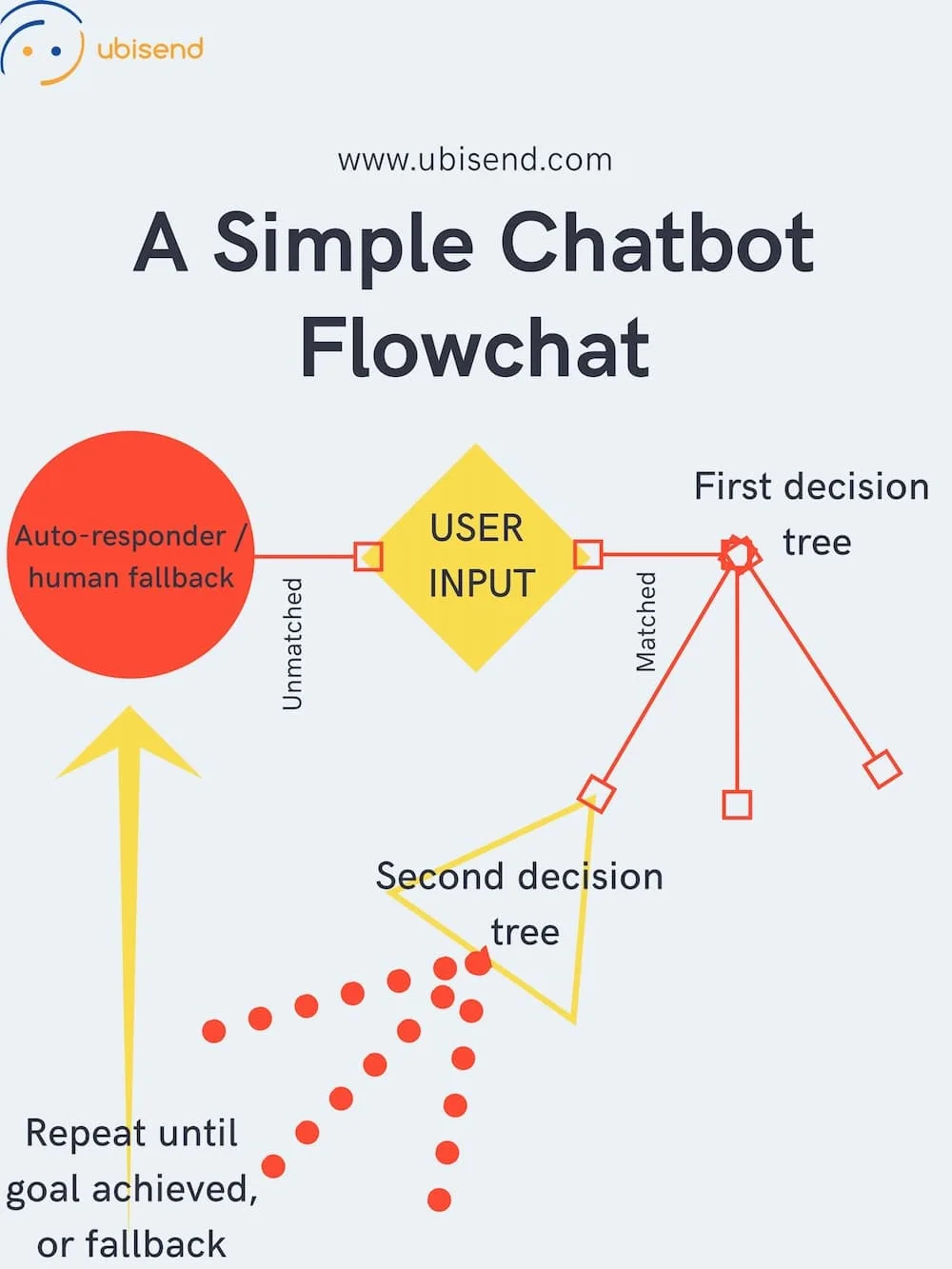
A simple chatbot flowchart showing user input processed through decision trees with fallback to auto-responder/human help.
OpenAI and other AI service providers require API keys for authentication, making proper key protection essential for preventing unauthorized usage and potential security breaches. Best practices include storing API keys as environment variables, implementing key rotation policies, and assigning unique keys to different team members or applications.[27]
WordPress implementations should never store API keys in plain text within configuration files or database records. Instead, keys should be encrypted using WordPress’s built-in encryption functions or stored in secure configuration management systems. Environment variable storage provides an additional layer of security by keeping sensitive credentials separate from application code.
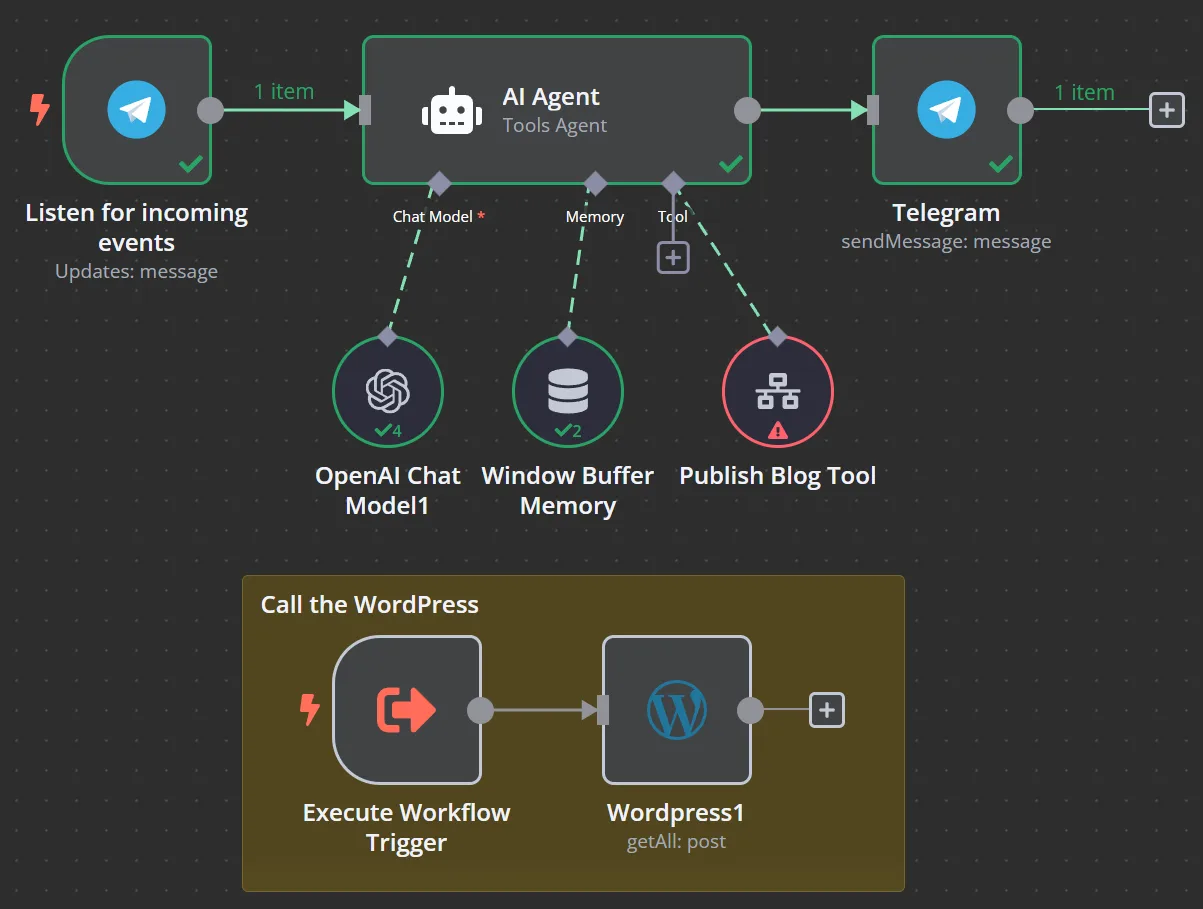
Workflow diagram showing integration of AI chatbot with WordPress and Telegram, including interaction with OpenAI chat model and WordPress posts retrieval.
Regular monitoring of API key usage helps identify potential security breaches or unauthorized access attempts. Most AI service providers offer usage monitoring dashboards that track request volumes, response times, and cost metrics. Implementing automated alerts for unusual usage patterns enables rapid response to potential security incidents.
Input Validation and Sanitization
Comprehensive input validation and sanitization protect WordPress chatbot implementations against injection attacks and data corruption.
User inputs must be thoroughly validated on both client and server sides to prevent malicious code execution and ensure data integrity. WordPress provides built-in sanitization functions including sanitize_textarea_field(), wp_strip_all_tags(), and esc_html() that should be consistently applied to user inputs.[17]
Rate limiting mechanisms prevent abuse by limiting the number of requests individual users can make within specified time periods. Implementation involves tracking request counts using WordPress transients or external caching systems, with configurable limits based on IP addresses or user accounts. Effective rate limiting balances security protection with user experience considerations.
CSRF protection ensures that chatbot requests originate from legitimate users rather than malicious scripts on external sites. WordPress nonce implementation provides built-in CSRF protection, requiring valid nonces for all chatbot API requests. This protection should be combined with proper CORS configuration to prevent unauthorized cross-origin requests.
Data Privacy and Compliance
WordPress chatbot implementations must address data privacy requirements including GDPR, CCPA, and other regional regulations. Conversation logging practices should include clear data retention policies, user consent mechanisms, and data deletion capabilities. Users should have the ability to request conversation history deletion and opt-out of data collection entirely.[20]
Encryption requirements extend beyond API key protection to include conversation data, session information, and user preferences. WordPress implementations should utilize HTTPS for all communications and implement database-level encryption for sensitive information. Regular security audits help identify potential vulnerabilities and ensure compliance with evolving regulations.
Third-party service integration requires careful evaluation of data sharing implications and compliance requirements. AI service providers may process and store conversation data according to their own policies, making it essential to review terms of service and privacy policies before implementation. Some organizations may prefer local AI implementations to maintain complete data control.
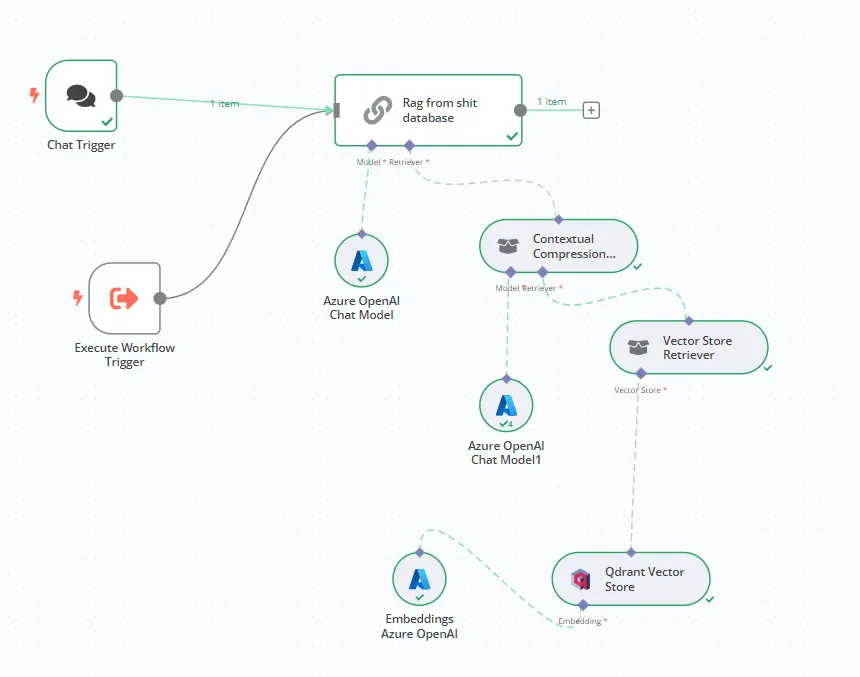
Workflow diagram showing AI chatbot backend integration using Azure OpenAI models and vector stores.
Advanced Configuration and Optimization Strategies
Conversation Flow Design and Management
Effective conversation flow design significantly impacts user engagement and chatbot effectiveness. WordPress chatbot implementations should incorporate sophisticated flow management capabilities including trigger conditions, decision trees, and fallback mechanisms. The design process begins with mapping user journeys and identifying common interaction patterns that can be automated through AI responses.
Trigger conditions determine when specific conversation flows activate based on user inputs, page context, or behavioral patterns. Implementation involves creating flexible rule systems that can evaluate multiple conditions simultaneously while maintaining conversation coherence. WordPress hooks and filters provide excellent mechanisms for implementing custom trigger logic that integrates seamlessly with existing site functionality.
Decision tree implementation enables chatbots to guide users through complex processes using branching logic based on user responses. This approach proves particularly effective for lead qualification, product recommendations, and troubleshooting scenarios. The implementation requires sophisticated state management to track user progress through decision trees while providing options for users to backtrack or restart conversations.[29]
Performance Optimization and Scalability
WordPress chatbot performance optimization involves multiple strategies including caching, database query optimization, and efficient API usage patterns. Conversation history caching reduces database load by storing frequently accessed conversations in memory using WordPress object caching or external systems like Redis. This approach significantly improves response times for users with extensive conversation histories.
Database query optimization becomes crucial as conversation logs grow over time. Implementing proper indexing strategies, query optimization techniques, and data archiving policies ensures consistent performance even with large datasets. WordPress provides excellent database abstraction layers that facilitate efficient query construction while maintaining compatibility across different database systems.
API usage optimization involves implementing intelligent caching strategies for AI responses, token usage monitoring, and request batching where appropriate. OpenAI and other AI services charge based on token usage, making efficient prompt engineering and response caching essential for cost management. Implementation should include monitoring dashboards that track usage patterns and identify optimization opportunities.[25]
Analytics and Performance Monitoring
Comprehensive analytics implementation enables data-driven optimization of chatbot performance and user experience. WordPress chatbot implementations should track multiple metrics including conversation completion rates, user satisfaction scores, response times, and common failure points. This data provides valuable insights for improving chatbot responses and identifying areas requiring human intervention.
Conversation analysis tools help identify patterns in user interactions that can inform chatbot training and optimization strategies. Implementation involves creating analytics dashboards that visualize conversation flows, identify bottlenecks, and highlight successful interaction patterns. WordPress provides excellent framework support for custom analytics implementation using hooks, filters, and database integration.
Performance monitoring systems should track both technical metrics such as response times and server resource usage, and business metrics including lead generation effectiveness and customer satisfaction scores. Automated alerting systems enable rapid response to performance issues while providing data for continuous improvement initiatives.
Advanced Features and Integration Patterns
Retrieval-Augmented Generation (RAG) Implementation
RAG implementation enables WordPress chatbots to access and utilize site-specific content for generating more accurate and contextual responses. This approach combines the general knowledge of large language models with specific information from WordPress databases, creating more relevant and useful chatbot interactions. The implementation involves creating knowledge bases from WordPress content including posts, pages, custom post types, and user-generated content.[35]
Content extraction and processing systems automatically update knowledge bases as WordPress content changes, ensuring chatbots have access to current information. Implementation involves creating scheduled tasks that scan WordPress content, extract relevant information, and format it for AI consumption. WordPress cron functionality provides excellent infrastructure for implementing these automated processes.
Vector database integration enables sophisticated content matching and retrieval capabilities that improve response relevance and accuracy. Popular vector database solutions including Pinecone, Weaviate, and Qdrant can be integrated with WordPress chatbots to provide advanced semantic search capabilities. This integration requires careful consideration of data synchronization, query optimization, and performance management.
Multi-Channel Integration and Workflow Automation
Modern WordPress chatbot implementations increasingly require integration with multiple communication channels including email, SMS, social media platforms, and mobile applications. This multi-channel approach ensures consistent user experiences across different touchpoints while centralizing conversation management within WordPress systems. Implementation involves creating unified APIs that can handle requests from various channels while maintaining conversation context and user identity.[28]
Workflow automation integration connects chatbot interactions with broader business processes including CRM updates, email marketing campaigns, and task management systems. WordPress provides excellent webhook and API infrastructure for implementing these integrations, enabling sophisticated automation scenarios that respond to user interactions with appropriate business actions.
Integration with WordPress ecosystem plugins enhances chatbot functionality by leveraging existing site capabilities. For example, WooCommerce integration enables chatbots to provide product recommendations, process orders, and handle customer service inquiries. Contact form integration allows chatbots to collect and process lead information while maintaining compatibility with existing marketing workflows.[37]
Deployment Strategies and Maintenance Procedures
Testing and Quality Assurance
Comprehensive testing strategies ensure WordPress chatbot reliability and user satisfaction before production deployment. Testing should encompass functional verification, performance validation, security assessment, and user experience evaluation. Automated testing frameworks can validate API functionality, conversation flows, and integration points while reducing manual testing overhead.
User acceptance testing involves gathering feedback from representative user groups to identify usability issues and optimization opportunities. This testing should include scenarios covering different user types, device categories, and interaction patterns. WordPress staging environments provide excellent infrastructure for conducting thorough testing without impacting production systems.
Performance testing validates chatbot behavior under various load conditions including high concurrent user volumes, API rate limiting scenarios, and database stress conditions. Load testing tools can simulate realistic usage patterns while monitoring system performance and identifying bottlenecks that might impact user experience.
Maintenance and Continuous Improvement
Ongoing maintenance procedures ensure WordPress chatbot implementations remain secure, performant, and aligned with evolving user needs. Maintenance activities include security updates, performance optimization, conversation data analysis, and feature enhancement based on user feedback and usage patterns.
Security maintenance involves regular updates to WordPress core, plugin dependencies, and AI service integrations to address newly discovered vulnerabilities. Monitoring systems should track security advisories and automate update processes where possible while maintaining compatibility with existing customizations.
Performance monitoring enables proactive identification and resolution of issues that might impact user experience. Regular analysis of conversation logs, API usage patterns, and system metrics provides insights for optimization initiatives that improve both technical performance and business outcomes.
Conclusion
The integration of AI chatbots into WordPress websites represents a significant opportunity for enhancing user engagement, automating customer support, and improving overall site functionality. This comprehensive guide has outlined three primary implementation approaches—plugin-based solutions, custom code implementations, and webhook-driven architectures—each offering distinct advantages for different organizational needs and technical capabilities. The choice between these approaches should consider factors including technical expertise, customization requirements, scalability needs, and long-term maintenance capabilities.
Security considerations remain paramount across all implementation approaches, requiring careful attention to API key management, input validation, rate limiting, and data privacy compliance. The evolving regulatory landscape around AI and data protection makes these security measures increasingly important for organizations deploying chatbot solutions. Regular security audits, monitoring systems, and update procedures ensure that implementations remain protected against emerging threats while maintaining compliance with applicable regulations.
The future of WordPress AI chatbot integration continues to evolve with advances in large language models, vector databases, and automation platforms. Organizations implementing chatbot solutions should design for flexibility and scalability to accommodate future enhancements including improved AI capabilities, expanded integration options, and emerging user interaction patterns. Success in chatbot implementation ultimately depends on combining technical excellence with user-centered design principles that prioritize meaningful, helpful interactions over purely automated responses.
⁂
Citations:
- https://wordpress.org/plugins/chatbot/
- https://www.youtube.com/watch?v=PzGFVqOzDsk
- https://www.qanswer.ai/blog/wordpress-chatbot-integration-guide
- https://www.voiceflow.com/blog/wordpress-ai-chatbot
- https://www.79mplus.com/how-to-integrate-ai-chatbots-into-wordpress-2025/
- https://wordpress.org/plugins/s2b-ai-assistant/
- https://elfsight.com/blog/how-to-add-chatbot-to-wordpress-website/
- https://codekyt.com/how-to-install-an-ai-chatbot-on-a-wordpress-site/
- https://www.kommunicate.io/blog/chatbot-for-wordpress/
- https://github.com/kognetiks/kognetiks-chatbot
- https://belovdigital.agency/blog/implementing-ai-powered-chatbots-in-wordpress/
- https://wpdeveloper.com/ai-powered-chatbots-for-wordpress-site/
- https://learnwithhasan.com/blog/free-ai-chatbot-on-wordpress/
- https://chatling.ai/docs/integrations/wordpress
- https://botpress.com/blog/wordpress-chatbot
- https://wp-umbrella.com/blog/wordpress-security-best-practices/
- https://wp-rocket.me/blog/wordpress-security-best-practices/
- https://mavengroup.in/15-must-follow-wordpress-security-best-practices-for-2025/
- https://www.wpbeginner.com/wordpress-security/
- https://botpress.com/blog/chatbot-security
- https://www.omi.me/blogs/ai-integrations/how-to-integrate-openai-with-wordpress
- https://nordlayer.com/blog/wordpress-security-best-practices/
- https://wordpress.org/support/topic/api-secure-endpoint/
- https://wordpress.org/plugins/ai-workflow-automation-lite/
- https://www.openassistantgpt.io/blogs/openai-api-integration-best-practices
- https://wordpress.com/plugins/ai-workflow-automation-lite
- https://help.openai.com/en/articles/5112595-best-practices-for-api-key-safety
- https://www.make.com/en/integrations/yourgpt-chatbot/wordpress
- https://www.tidio.com/blog/chatbot-flowchart/
- https://www.engati.com/blog/design-chatbot-flow-chart
- https://marutitech.com/chatbots-work-guide-chatbot-architecture/
- https://wordpress.com/plugins/flowcharts-ai
- https://www.cis.upenn.edu/wp-content/uploads/2021/10/Xufei-Huang-thesis.pdf
- https://www.kommunicate.io/blog/integrate-openai-to-wordpress-website/
- https://ainiro.io/blog/create-a-high-quality-wordpress-ai-chatbot
- https://www.wpbot.pro/chatbot-workflow/
- https://wpforms.com/ways-to-use-openai-on-your-wordpress-site/
- https://www.youtube.com/watch?v=bkVmxyX9NKE
- https://clouddevs.com/wordpress/implementing-a-chatbot/
- https://ppl-ai-code-interpreter-files.s3.amazonaws.com/web/direct-files/615cdd1739a2b41ec3d9508651a17cb6/62fe8df5-aa19-4307-9942-9f98859e71fc/6094282d.csv